
Earlier this year we ran a survey about LibreOffice Base. Similar to the questionnaires about LibreOffice Draw (see first and second blog post) and LibreOffice Calc, we asked about use cases, the most important features, the pain points – and what users expect in the future to support development and to gather ideas how the user interface and workflow can be improved. In total, 455 participants completed the questions. Thanks a lot to everyone who took the time!
Demographics
As usual, the survey is heavily biased. The attendees self-estimate their expertise above the average, run the application more frequently, and show a different distribution in operating system usage compared to regular users.
Applications
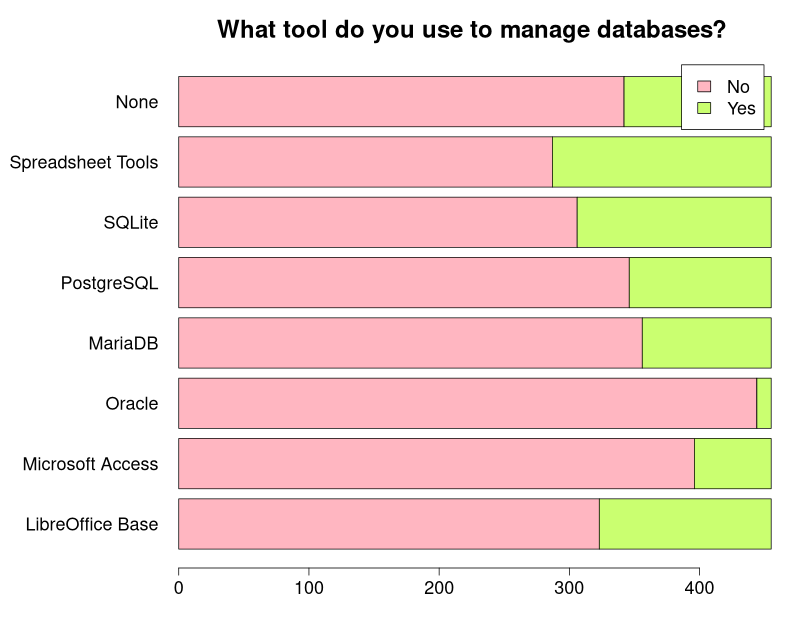
To start off, we asked what tools they use. We included Spreadsheet Tools to also cover users who do not actually use a database, but think of a spreadsheet as kind of data storage. Participants responding None, obviously not managing any database, got a different follow-up question.
Features
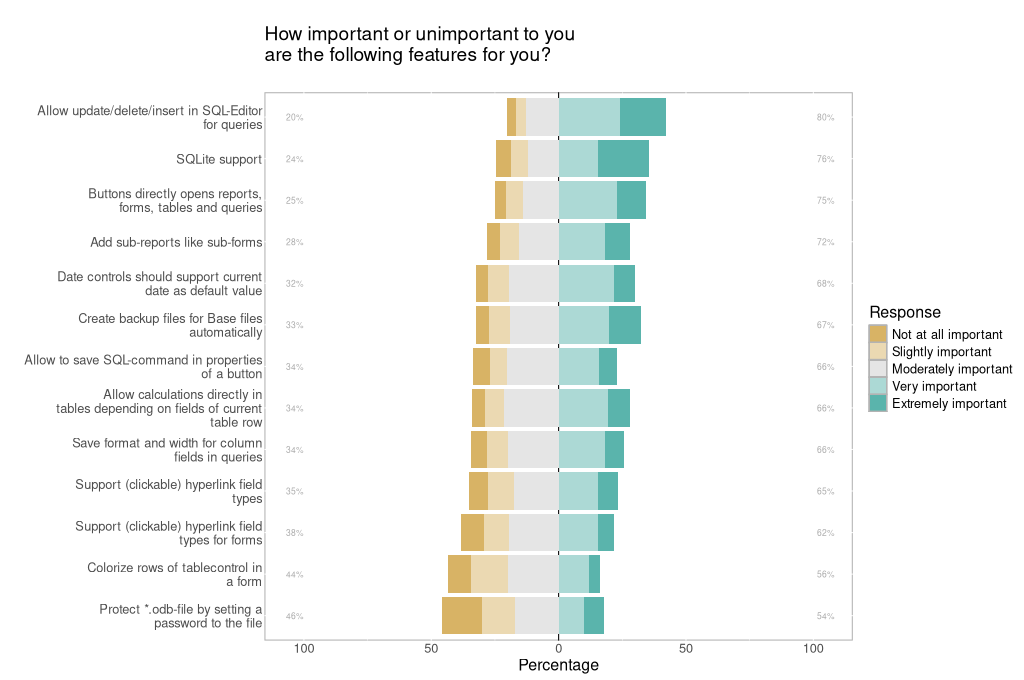
To trigger the idea of the following open questions, we asked about the importance of different features. Unlike the large number of functions in other modules, Base offers queries, reports, forms, tables, etc. which are all essential for the work with databases. Therefore we collected some features that may or may not be relevant for a sub-group or have room for improvements.
What is your use case for the database management system?
People understand the question differently, and reply very short or rather verbosely. The answers may point to a professional environment if “payroll information for up to 10000 people” is mentioned, over SME’s processing order management, production count, and shipment status, to obviously private usage. The following attempt to categorize the answers cannot do justice to the variety of all replies:
- Catalogs/Inventory: In-house Bakery, Receipts, Music/Books, CD/DVD, Musical scores. Plant samples, Publications/Scientific research, Health data
- Web/Software: Backend storage, Software development, Websites, Managing SQL
- ERP/Finance: Order management/Production count/Shipment status, Invoicing, User data, Cost management, Expenses,
- Storing addresses and mail merge processing
For example:
“I use it mostly as place to store sensitive customers data. But since I have small quantities of information, I switched to LibreOffice Calc, which files can be also locked with the password.”
“Smaller business applications in the freight forwarding and logistics sectors, such as fleet management, warehouse management, category management, and invoicing.”
“Managing geospatial information with PostgreSQL/PostGIS and creating reports with the information from the attribute table using LibreOffice Base/Writer.”
“Storing data when it gets too big/slow for a CSV file for personal or internal work (engineering) projects.”
In your opinion, which LibreOffice Base features (if any) need improvement the most, and why?
The majority asks for improvements to the user interface with less clutter and a more attractive design. The workflow and user experience should become either simplified or more powerful, depending on the expertise and the scenario. For example, an elaborated search function is something that many people expect.
“The current interface feels outdated compared with modern database tools. Needs improvement, cleaner layout, better navigation panel, dockable windows, modern icons, dark mode support and improved table designer.”
“It needs a straightforward and accessible search feature that searches the entire database. In Microsoft Access, as soon as you open the program there is a search feature which allows you to search the entire database.”
Almost the same number of answers requests bug fixes, improvements to stability, and better performance. Issues with queries, forms, and reports were mentioned equally often. In this regards, many replies suggest to remove the Java dependencies.
“Stability. I spent weeks teaching myself how to use Base, only for instability with the engine to ruin the project I was working on. That was years ago, and I haven’t attempted anything with Base since.”
“Base works well for small projects but with larger databases (hundreds of thousands or millions of records), performance could be improved. E.g. faster filtering, faster sorting, better indexing tools, lazy loading and background processing.”
People wish for better connectivity asking for SQLite, mySQL/mariaDB, and PostgreSQL, some ask for HSQLDB some for Firebird.
“SQLite support, since this is a de facto standard with versatile support everywhere”
“The support for internal Firebird databases. After years, the feature is still experimental. Firebird should be a very good alternative for the old HSQLDB and one measure to reduce the dependency from Java in Base. HSQLDB also has performance issues if the database is huge.”
“Améliorer HSQL et supprimer FireBird qui pose beaucoup de problèmes (translated: Improve HSQL and remove Firebird, which causes many problems)”
Among this, a connection to LibreOffice Calc is also in users’ mind. This may be importing/exporting CSV (and ODS) but also “the ability to bridge between Calc and Base should be emphasized and improved to provide a pivotal user advantage versus competitor products”.
Most issues marked “Moderately important ” above, I solved with macros. BASE using Backends like PostgreSQL or Maria should support fast search through the connectors; actually it runs through all records and is very slow; indexing the tables is not used at all.
And last but not least, people ask for documentation, wizards, tutorials, and templates.
I’ve used it a couple of times. It took a lot of effort to learn how to. Help and tutorial resources could be a great deal more accessible.
Use of a simple address database for everybody and average small company
What do you expect from LibreOffice Base in the future? What new features would you like to see?
People pick up their response to the previous “pain points” question and expect those to be solved (if not discouraged by the slow development over the past years). That means we should invest in a better UI, improved connectivity, more stability, etc.
Some tools were mentioned as prototype (with personal categorization):
- Database management tools: Dbeaver, DuckDB, Toad, Letos (formerly known as SQLiteStudio)
- Spreadsheet-like tools: Grist, Filemaker, Powerquery, Baserow, Anytype
- AI-focused tools: Airtable, N8N, Notion
- Query language: Query by Example (QBE), Object–relational mapping (O/RM), Sparql
“A Toad-like environment to be added. Wizards for creating your first databases, some explanation of basic SQL and database concepts. Adopt the Tabbed UI optionally like the other LibreOffice modules if it makes sense. Become a great tool for education and teaching. Base has huge potential to do this, try to be simple to use, be a tool that people choose because of this. Someway to import Microsoft Access databases”
“Rather than competing directly with enterprise database systems, I would like LibreOffice Base to become the best free, open-source, no-code/low-code database application for individuals, educators, researchers, nonprofits, and small organizations. It could combine the simplicity of a desktop application with modern capabilities such as AI assistance, SQLite integration, responsive forms, REST APIs, full-text search, and rich reporting—while remaining interoperable with databases like PostgreSQL, MariaDB, and SQLite.”
“The big dream I have is that LibreOffice show everyone how to gracefully move between spreadsheets and databases. I know SO MANY small complicated Enterprises running on badly overgrown spreadsheets.”
Summary
In comparison to previous surveys it is difficult to ask similar questions- and to answer it . Database management relies on data input (forms) and data output (reports) as well as tables and a connection to a database. On the other hand, simple use cases can be satisfied via spreadsheets, too. And many non-experts may wonder what LibreOffice Base (and any other DBMS) is good for. The survey gives an answer:
- Security/Privacy: storing sensible user data with encryption and advanced authentication
- Efficiency: when it comes to a large number of data that need be searched or filtered but also in case of relational dependencies like customer-purchases
- Structure: different users entering complex data via forms is not only comfortable but also ensures the correct data type
These key features can be solved more user-friendly than with the classic approach that LibreOffice Base follows, using (rather separated) tables, queries, and forms. If we make Base some kind of “advanced Calc” similar to text editors versus Writer, the entry to databases should become much less a hurdle. Connections to various databases could be as easy as loading or saving different file formats, templates with some exemplary data could allow easy adoption to own needs, and the generation of forms may become as simple as common UI design tools show.
Of course we also have to fix issues from the past. Users reported a large number of bugs and enhancement requests. You are welcome to add your own issue, to comment on requests, or to suggest solutions. If you want to connect with other users we created a chat room on Matrix.
Raw data, R scripts, and the text analysis can be downloaded here.

I applaud your research into how you can improve Base as a piece of LibreOffice. I have struggled to implement your mail-merge function into a simple Christmas card mailing list for a number of years. The label creation function and its connection to the database itself are kludgy and complex. The documentation is old and incomplete. The creation of a data source is confusing, I’m still not sure what the underlying database structure is called and therefore have trouble trying to create a data source that I can use. Once certain decisions are made it is often difficult to review or modify them. Definitely better integration with Calc would be helpful. (If it is already there I can’t figure it out.) :-)
Keep up the good work.
One thing jumps out at me – “which tool do you use to manage a *database*?”. And then it provides a list of *relational* databases, with no option for “other”.
Okay, I’ve been intending to do this for years :-) but I would like to link LO to ScarletDME (the DME stands for Data Management Environment). To give you an idea of the difference between Scarlet and your typical Relational database, a single “row” in Scarlet would load into a spreadsheet pivot table, not a spreadsheet row. It’s a much richer, more complex (and easier to understand) environment than your classic “rows and columns” data structure.